
Enabling OCSP Stapling on Your Server
Samantha ClarkShare
OCSP stapling represents a significant advancement in how SSL Certificates validate their current status, offering improved performance and security for websites.
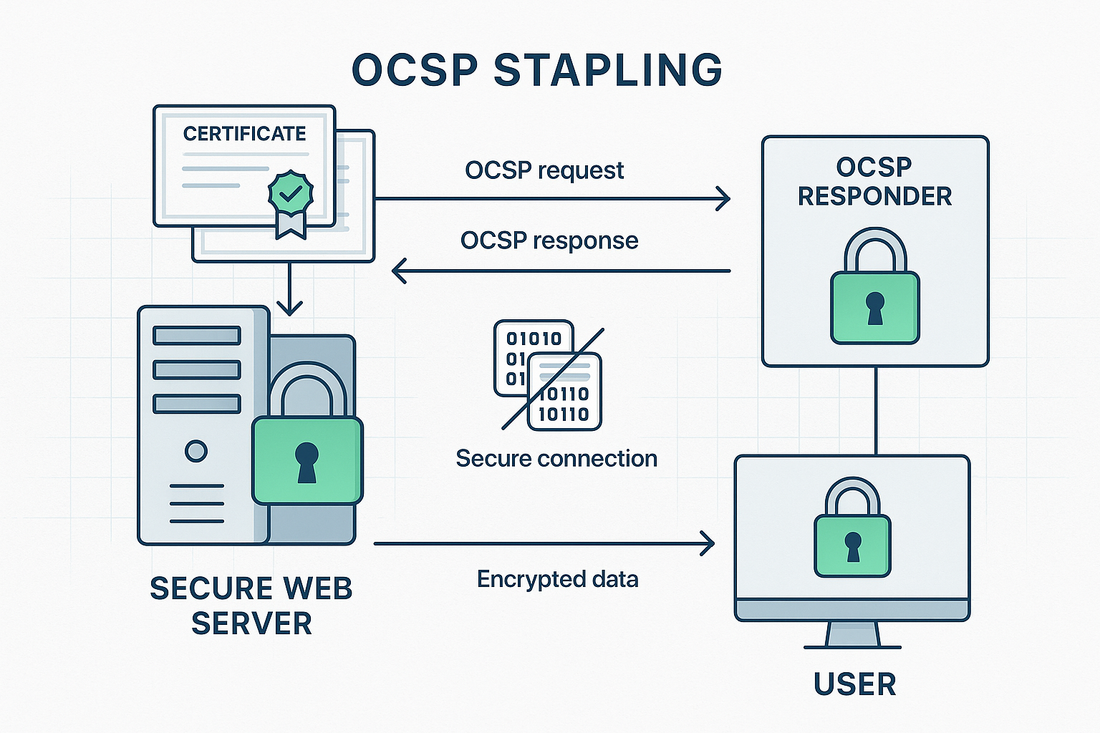
This protocol enhancement allows web servers to obtain time-stamped OCSP responses from Certificate Authorities and attach or "staple" these responses to the SSL Certificate handshake, dramatically reducing the verification burden on clients and browsers.
Understanding OCSP Stapling
Online Certificate Status Protocol (OCSP) stapling, technically known as TLS Certificate Status Request extension, addresses the traditional performance challenges associated with SSL Certificate validation.
Instead of requiring browsers to independently verify a SSL Certificate status with the Certificate Authority, the web server periodically obtains and caches the OCSP response, then delivers it during the SSL Certificate handshake process.
This optimization significantly reduces connection times, enhances privacy, and improves the overall reliability of SSL Certificate validation.
For businesses utilizing Trustico® SSL Certificates, implementing OCSP stapling can lead to notably faster page load times and a better user experience.
Prerequisites for Implementation
Before enabling OCSP stapling on your server, certain requirements must be met. Your web server must run a compatible version of the server software, typically Apache 2.3.3 or later, Nginx 1.3.7 or later, or IIS 7 or later.
Your server needs reliable internet connectivity to reach the OCSP responder servers, and sufficient system resources to cache and manage OCSP responses.
Additionally, ensure your firewall rules allow outbound connections to the Certificate Authority OCSP responder servers on port 80 or 443.
Configuring OCSP Stapling on Apache
Apache Configuration Steps
The Apache web server requires specific modifications to the SSL Certificate virtual host configuration. First, ensure the mod_ssl module is enabled.
Within your Apache configuration, locate the SSL Certificate virtual host block and add the following directives :
SSLUseStapling On
SSLStaplingCache shmcb:/tmp/stapling_cache(128000)
SSLStaplingResponderTimeout 5
SSLStaplingReturnResponderErrors off
SSLStaplingFakeTryLater off
These settings enable OCSP stapling, configure the response cache, and set appropriate timeout values.
After making these changes, restart the Apache service to apply the new configuration.
Implementing OCSP Stapling on Nginx
Nginx Configuration Process
Nginx configuration for OCSP stapling requires modifications to the server block in your configuration file. Add the following directives to enable and configure OCSP stapling :
ssl_stapling on;
ssl_stapling_verify on;
ssl_trusted_certificate /path/to/chain.pem;
resolver 8.8.8.8 8.8.4.4;
The resolver directive specifies DNS servers used to resolve the OCSP responder hostname.
The ssl_trusted_certificate path should point to your complete SSL Certificate chain file. Remember to restart Nginx after making these changes.
Verifying OCSP Stapling Configuration
Testing and Validation
After implementing OCSP stapling, verification is crucial. Use OpenSSL command line tools to test your configuration :
openssl s_client -connect example.com:443 -status
A successful implementation will show "OCSP Response Status: successful" in the output. The response should also include current timestamp information and the OCSP responder URL.
Troubleshooting Common Issues
Connection Problems
If OCSP stapling fails to work, first verify network connectivity to the OCSP responder. Check your firewall rules and ensure the server can reach the Certificate Authority OCSP servers.
Common error messages like "OCSP response not received" typically indicate network or configuration issues.
Certificate Chain Issues
Incomplete or incorrect SSL Certificate chains often cause OCSP stapling failures. Ensure your SSL Certificate installation includes the complete chain of intermediate SSL Certificates.
The ssl_trusted_certificate file must contain the full SSL Certificate chain for proper OCSP validation.
Performance and Security Benefits
OCSP stapling provides significant performance improvements by reducing SSL Certificate handshake times. This optimization is particularly valuable for mobile users or those with high-latency connections.
From a security perspective, stapling prevents certain types of attacks by ensuring SSL Certificate status checking cannot be bypassed.
Best Practices and Maintenance
Regular monitoring of OCSP stapling functionality is essential. Implement automated checks to verify stapling remains operational.
Configure appropriate cache timeouts to balance performance with freshness of OCSP responses. Consider implementing redundant DNS resolvers to ensure reliable OCSP responder resolution.
Summary
OCSP stapling represents a crucial optimization for modern SSL Certificate deployments. By implementing this protocol extension, organizations can significantly improve their website performance while maintaining robust security validation.
Trustico® SSL Certificates fully support OCSP stapling, enabling businesses to leverage this important technology.
Remember to regularly monitor your configuration and keep server software updated to ensure continued optimal performance of your OCSP stapling implementation.


